The premise
NERVE is a fictional chocolate brand I invented as a sandbox. The goal was to answer one question: can a single marketer take a brand from blank page to a finished commercial using only AI tools, and can the process be made repeatable for real clients, not just a one-off?
So I built the whole thing myself: the brand name and positioning, the visual identity, the concept, the script, the footage, and the final edit.
The problem it's really about
Great video has always taken a full team: a crew, talent, a location, and the budget to bring them together. That craft is exactly why a good commercial lands the way it does. But that level of production is out of reach for a lot of the early-stage, founder-led brands I work with, at least for the steady stream of content they need day to day.
The question I wanted to answer was whether AI could open a door for those brands: not to replace the craft, but to give smaller teams a fast, affordable way to make branded video they otherwise could not. Can one person produce a usable branded film in days, for the cost of a subscription, and make the process repeatable? NERVE is my proof that the answer is yes.
What I built
- Invented the brand end to end: name, positioning, tone, and visual identity.
- Wrote the concept and a full shot list.
- Generated reference stills and keyframes with Gemini (free) and GPT Image.
- Generated the footage with Higgsfield, using models like Seedance and Kling, shot by shot.
- Stitched the Higgsfield Seedance 2.0 clips together manually in CapCut and added all sound effects by hand. Higgsfield can handle stitching and sound in its own settings, but that costs credits, so I moved that work to a free tool instead.
- Set the on-screen tagline manually in Canva with a touch of Gemini, since AI video still struggles with clean, correctly-spelled type.
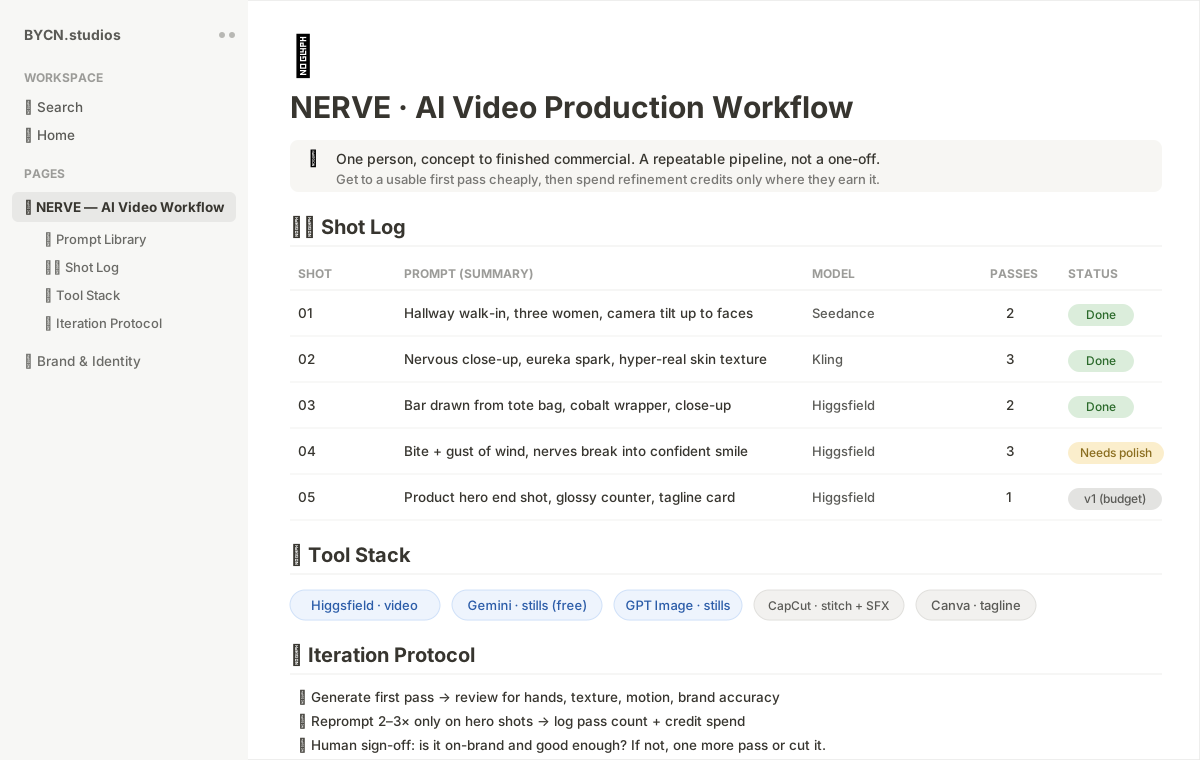
- Documented the entire process as a repeatable workflow in Notion: a prompt library, a shot log, and the iteration protocol. That way the process can be re-run for a real brand, not just this one.
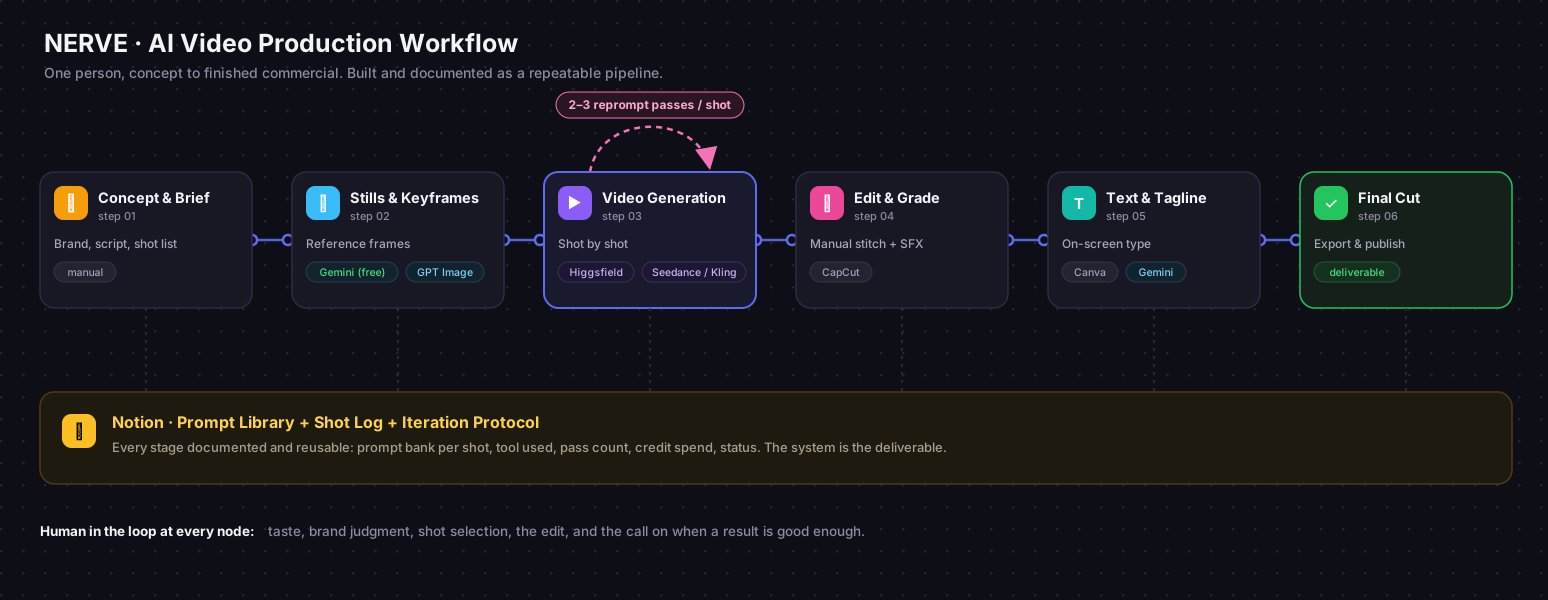
The workflow is the actual deliverable here. The commercial is the demo; the documented, repeatable system behind it is what a marketing team would actually pay for.
Here is what the framework looks like documented in Notion, the prompt library, shot log, tool stack, and iteration protocol in one place:
How I structure the prompts
Prompting is not typing a wish into a box. My method, documented in the Notion workflow:
- Visualize the whole ad first. Before touching any tool, I write the full story in plain language, like a director's treatment: who the character is, what she feels, what changes, what the punchline is.
- Chunk it into 1 to 5 second scenarios. AI video models hold coherence for only a few seconds, so I break the story into shots of that length and write each one as its own scene with a clear beginning and end state.
- Build a moodboard and storyboard from stills. Cheap or free still generations lock the look: character, wardrobe, lighting, location. These become the visual reference the video prompts must match.
- Draft each prompt with Claude. I feed Claude the treatment, the shot list, and the continuity rules, and structure every prompt with the same anatomy: subject and emotion, action, camera movement, environment, then closing style tags.
- Keep the continuity tags identical across shots. Repeating the same closing tags (photorealistic, fine fabric and skin texture, documentary realism, no glow) is what makes ten separate generations read as one continuous world.
- Log everything in Notion. Every prompt, model, pass count, and credit spent goes in the shot log, so the next project starts from a working system instead of zero.
A few of the real prompts
The prompts are half the craft. Consistency comes from repeating the same closing style tags across every shot (photorealistic, fine fabric and skin texture, documentary realism, no glow) so the whole film reads as one continuous world. Three examples from the shot list:
The eureka close-up
Tight close-up of the blonde woman in the busy university hallway, softly blurred behind her. She holds a nervous, struck, wide-eyed stare for a moment, then her expression slowly shifts as an idea arrives, her eyes lifting and brightening, a small hopeful spark of a eureka moment breaking through the nerves. Hyper-realistic skin with visible pores, fine facial texture, natural skin detail, candid documentary realism, soft natural daylight, photorealistic, no glow.
The hero transformation (bite plus wind)
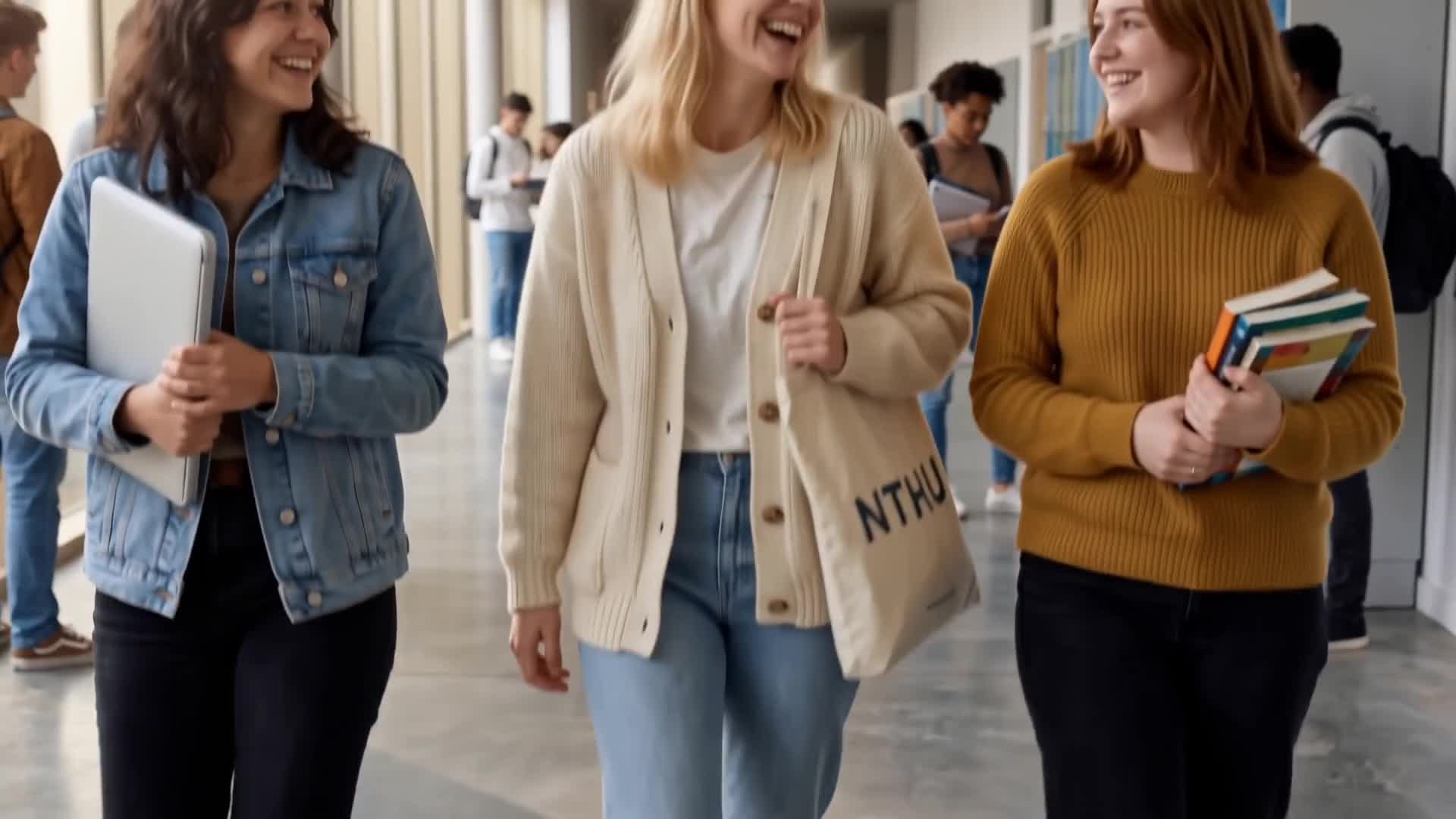
A young blonde woman in a cream cardigan takes a real bite of a blue NERVE chocolate bar. Her expression is nervous and uncertain as she begins to chew. Then, as she swallows, the camera punches in fast toward her face while a strong gust of wind suddenly blows her hair back. Her uncertainty breaks into a calm, confident smile, eyes sharpening, chin lifting. The camera stays front-on the entire time, only pushing straight in. Cinematic, photorealistic, energetic, sharp fast zoom, no glow.
The product end card
Premium cinematic TV commercial end shot for a fictional chocolate bar called NERVE, blue-wrapped, on a glossy reflective counter in a softly lit background. Slow push-in from a low front angle. Hold on the product hero frame with clean bold text: NERVE, "You're not you when you're nervous." Funny, memorable, polished, like a snack bar ad parody. Shallow depth of field, realistic reflections, 4K commercial look. No distorted text, no wrong spelling.
The stills, and how I saved credits
Video credits are the expensive part of this pipeline, so the strategy was simple: do all the visual exploration where it costs nothing. I used the free tiers of Gemini and ChatGPT to generate every still: the product itself, the protagonist, and the reference frames that lock character, wardrobe, and lighting before a single video credit is spent. Getting these right first is what keeps the video generation from drifting.
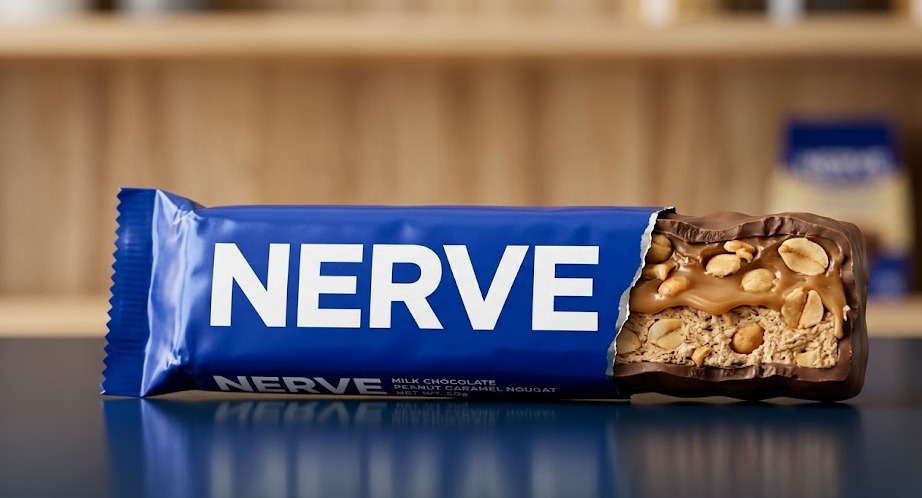
The product, generated in Gemini:
The protagonist reference:
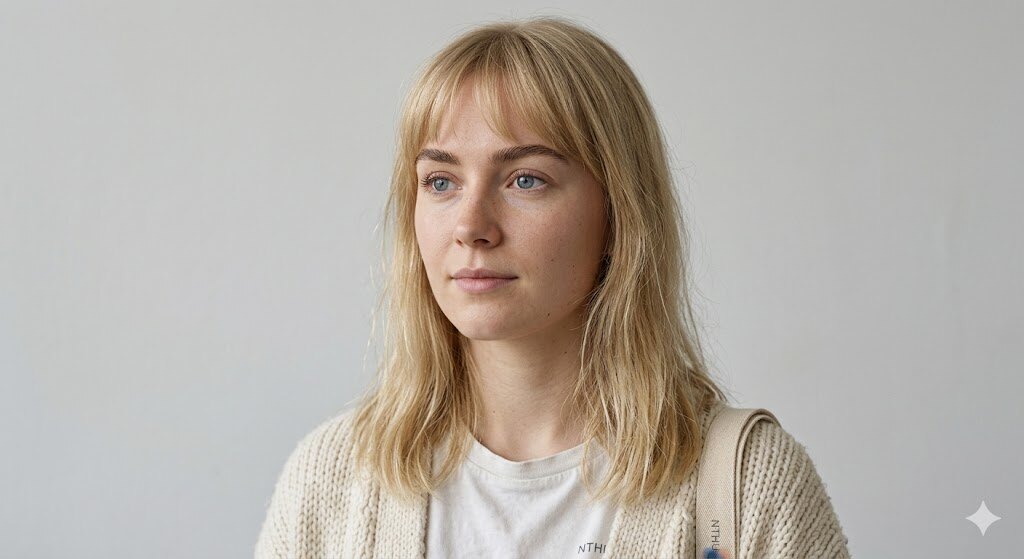
A note on the product shot, because I want to critique my own work the way I would a client's: the wrapper and wordmark came out crisp, but the foil creases are a little too uniform, the cross-section of caramel and peanuts reads slightly illustrated rather than photographed, and the reflection on the counter is cleaner than real light would allow. With paid credits I would run reference-based refinement passes with macro food photography cues (matte foil with irregular micro-creases, crumb detail, slight asymmetry in the filling). On a free tier, this is a strong v1, and knowing exactly what is wrong with it is half the job.
Gemini vs ChatGPT, side by side
I generated stills in both, from the same scene descriptions. Both are genuinely capable, and the differences that mattered had less to do with raw quality and more to do with workflow:
| Gemini (free) | ChatGPT / GPT Image (free) | |
|---|---|---|
| Photorealism | Very strong on people and daylight scenes | Strong, slightly more "rendered" look on skin |
| Iterative editing | Kept conversation context, so "same scene, but..." edits stayed consistent | Free tier lost my conversation history, so each edit restarted from scratch |
| Text and product accuracy | Good wordmark rendering, occasional label garble in backgrounds | Best-in-class text rendering on the wrapper |
| Free-tier comfort | Generous enough to iterate a full storyboard | Tighter limits, better for one-off hero frames |
| My verdict | My daily driver for this project | The precision tool for text-heavy frames |
My experience favoured Gemini, mostly because iteration is everything in this workflow and Gemini held onto the conversation, so a change like "same hallway, now she is holding the bar, bitten, same hand position" built on everything before it. On ChatGPT's free tier the history did not persist for me, which made continuity edits expensive in effort.
On blind human-preference leaderboards, ChatGPT's image model (the GPT Image family) currently ranks first: as of July 2026, GPT Image 2 leads the Artificial Analysis Image Arena at 1336 Elo, with Google's Gemini image models close behind. Elo here works like a chess rating: real people see two unlabeled images from the same prompt and pick the better one, so the ranking reflects preference, not marketing.
The lesson I take from the gap between the benchmark and my experience: the best model on the leaderboard is not automatically the best model for your workflow. On a real budget, free-tier access, iteration comfort, and whether the tool holds context across edits can matter more than a few Elo points. The skill is knowing both: what the benchmarks say, and what your actual constraints reward.
What I would fix for realism, and the prompts that fix it
Looking at the stills with a critical eye, the tells are always the same: skin tone is too even, eyebrows are painted rather than made of hairs, pores vanish under an airbrush sheen. The fixes live in the prompt. Additions that consistently pushed my results toward real:
natural uneven skin tone with subtle redness around the nose and cheeks, visible pores, individual eyebrow hairs, a few flyaway hairs, faint under-eye texture, no beauty filter, no airbrush, unretouched candid photography
And for the environment:
imperfect background details, slightly scuffed floor, uneven daylight, real lens depth of field, documentary photography
Even with all of that, I will say it plainly: parts of this project still read as AI, what people rightly call AI slop, because a tight credit budget means stopping at pass one or two instead of pass three or four. That is exactly why prompting well matters, and why the human eye matters more. The tools make mistakes constantly. Someone has to catch them, name them precisely, and know which ones are worth the credits to fix.
The full ad
The finished v1 cut:
One production choice worth naming: the assembly itself was manual. Higgsfield can stitch generated clips and handle sound inside its own settings, but that spends credits, so I exported the raw Seedance 2.0 clips and did the stitching, pacing, and every sound effect by hand in CapCut. Same principle as the stills: push every task that a free tool can do onto the free tool, and save the paid credits for the one thing only the paid tool can do, which is generating the footage itself.
And my own honest review of it, the same way I would review anyone's work. The transitions between shots are not smooth yet; each clip was generated separately, so the cuts rely on the edit to hide seams that a real camera move would carry. The surroundings drift: the hallway is never quite the same hallway twice, and background students occasionally walk with that weightless AI gait or blur into each other. Movement cadence is slightly off in places, especially hands and hair. These are exactly the artifacts that 2 to 3 additional refinement passes per shot are for, and exactly what the credit budget did not cover.
I am showing the v1 anyway, on purpose. A polished final with no explanation teaches nothing. A budget v1 with a precise list of what is wrong with it and what it costs to fix shows the thing that actually matters: I can see the gap between AI output and broadcast quality, name it, and price it.
The honest part, and why it matters
The current cut still reads as AI in places, and I want to be transparent about why. Getting AI video to fully photoreal takes roughly 2 to 3 reprompt passes per shot to clean up the small details: hands, textures, motion. I built this version inside a tight credit budget, so what you're seeing is the fast, low-cost first pass, not the polished ceiling.
That constraint is the point, not an excuse. Any marketing team using these tools is working with a budget. The real skill is knowing where the cost sits, how many iterations a given shot needs, and which shots are worth spending credits on. The workflow I documented is built around exactly that logic: get to a usable first pass cheaply, then spend refinement credits only where they earn it.
What this demonstrates
- End-to-end ownership: brand, concept, production, and edit, by one person.
- A repeatable, documented AI video workflow, not a lucky one-off.
- Cost-aware production: understanding the iteration curve and budgeting credits against it.
- The kind of fast, low-cost branded content that's genuinely useful for marketing and for automating repetitive content production.
Why this still needs a human
The tools are extraordinary, but a prompt does not make a commercial. Making NERVE actually work end to end reminded me exactly where the human belongs in this pipeline, and it is not a small role.
- Taste and judgment. AI generates infinite options. A person decides which one is actually good, which one is on brand, and which one to throw away. Volume is cheap now. Judgment is not.
- Strategy and concept. The tools can render a scene, but they can't tell you why the brand exists, who it's for, or what it should make someone feel. The idea, the positioning, and the story still start with a person.
- Emotional and cultural read. Knowing what will genuinely move an audience, what lands as charming versus what tips into uncanny, what fits the moment, that is human intuition. It's the difference between content that performs and content that's just technically impressive.
- The edit. Meaning is made in the sequence and the pacing, not in any single generated clip. Deciding the order, the rhythm, and the cut is where a pile of footage becomes a story.
- Creative direction of the AI itself. Knowing what to ask for, how to iterate with intent, and when a shot is done is a real skill. The model is the crew; the marketer is the director.
- Accountability. A human owns whether the output is truthful, brand-safe, and right for the audience. The tool doesn't answer for the result. The person does.
That is the part I care about most. These tools make one person far more capable, but they make the human's taste, strategy, and judgment more important, not less. My value is not that I can run the tools. It is that I know what to point them at, and when to say a result is not good enough yet.
What I'd do next with a production budget
- Run 2 to 3 refinement passes on each hero shot to push it to photoreal.
- Build variant cuts for different channels (a 6-second hook, a 15-second social edit, a full 30).
- Templatize the prompt library further so a new brand can be dropped into the same pipeline in a day.